

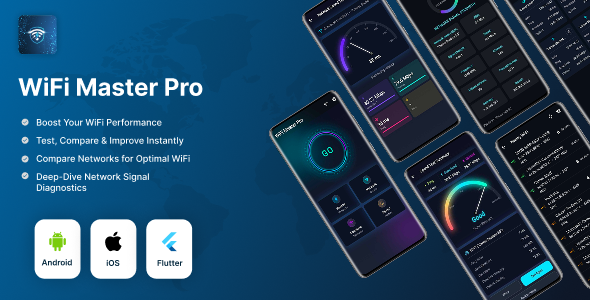
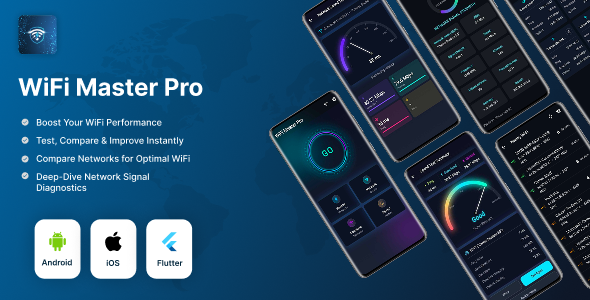
WiFi Grasp Professional – WiFi Pace Take a look at App (Ping/Jitter/Obtain/Add) + WiFi Analyzer + Historical past Export (Flutter 3.35.7 | Android & iOS)
WiFi Grasp Professional is a premium Flutter software to check web velocity with
Ping, Jitter, Obtain & Add, scan close by Wi‑Fi networks, view full community particulars,
evaluate networks, and export historical past to CSV/PDF.
Consists of Android APK and full Flutter supply code. Runs completely on Flutter 3.35.7.




Fast Data (Purchaser Pleasant)
- Flutter Model: 3.35.7 (advisable/suitable)
- Platforms: Android + iOS (supply included)
- APK Included: Sure (Android demo/testing)
- Backend Required: No
- Monetization: AdMob built-in (Banner + Interstitial + App Open)
- Analytics/Crashes: Firebase Analytics + Crashlytics built-in
- Internet Help: Not supported by default (makes use of
dart:ionetworking)
Desk of Contents
- Key Options
- Full Characteristic Listing
- Included Screens
- Tech Stack
- Set up Information
- AdMob Setup
- Firebase Setup (Optionally available)
- Troubleshooting
- FAQ
- Help / Contact
Key Options (Highlights)
- Pace Take a look at: Ping + Jitter + Obtain + Add
- Dwell gauge, easy animations, and progress phases
- Community Analyzer: SSID, BSSID, IP, RSSI, Hyperlink Pace, Frequency, Channel, Gateway, Subnet, Public IP
- Close by Wi‑Fi scanner with auto refresh
- Evaluate networks (grouping + sorting + traits)
- Historical past + Export CSV/PDF
- Share outcomes + share exported information
- Native notifications on check completion
- Offline banner + community misplaced dealing with
- AdMob Prepared: Banner + Interstitial + App Open
- Firebase Prepared: Analytics + Crashlytics
- Clear, scalable Flutter codebase (screens/providers/fashions)
Full Characteristic Listing
A) Pace Take a look at Module (Actual-time)
- Measures:
- Ping / Latency (ms)
- Jitter (ms) (ping variability)
- Obtain velocity (Mbps)
- Add velocity (Mbps)
- Actual-time UI:
- Animated Pace Gauge
- Dwell values throughout check (instantaneous velocity)
- Section progress indicators (Ping/Obtain/Add)
- “Making ready check…” state for higher UX
- Consequence processing:
- Information Obtained / Information Despatched
- Obtain Stability / Add Stability (%)
- Total high quality label (Wonderful / Good / Truthful / Weak)
- Reliability:
- Stops safely if connectivity drops throughout check
- Works over HTTPS endpoints (no backend required)
 Consequence Abstract Display
- Abstract UI for Ping/Obtain/Add
- Sign/high quality indicator
- Further metrics: jitter, knowledge despatched/obtained, stability
- Actions: Share outcomes, Take a look at once more, Again to Dwelling
C) Historical past Module
- Native historical past storage (saved on system)
- Grid format for earlier outcomes
- Actions: Open particulars, Delete single report, Clear all historical past
- Share/Export menu: Share newest, Export CSV, Export PDF
D) Export Options
- Export all historical past as CSV
- Export all historical past as PDF
- Share exported information by way of system share sheet
E) Sharing
- Share velocity check abstract (Ping/Obtain/Add + connection label + timestamp)
F) Community Particulars (Wi‑Fi Analyzer)
- SSID (Wi‑Fi identify)
- BSSID (AP MAC deal with)
- Native IP
- RSSI (dBm) (system/platform dependent)
- Hyperlink velocity (Mbps) (system/platform dependent)
- Frequency (MHz) (system/platform dependent)
- Channel detection from frequency
- Gateway IP
- Subnet masks
- Public IP (by way of HTTPS lookup)
G) Close by Wi‑Fi Scanner
- Scan close by Wi‑Fi entry factors
- Auto refresh mode ON/OFF
- Handbook scan button
- Exhibits:
- SSID (or hidden SSID indicator)
- BSSID
- Frequency
- Sign energy bars
- Safety lock icon for secured networks
- Pleasant dealing with:
- Lacking permissions
- System settings restrictions
- No networks discovered
H) Evaluate Networks
- Teams outcomes by Wi‑Fi identify/connection label
- Search by community identify
- Type by: Obtain, Add, Ping, Samples depend
- Pattern visualization (sparkline)
- Expandable playing cards for extra particulars
I) Native Notifications
- Notification when velocity check completes
- Faucet notification to open outcomes/historical past move
J) Offline Dealing with
- Offline banner overlay within the app
- Stops check if web connection is misplaced
Ok) Adverts & Monetization (AdMob)
- Adaptive Banner Adverts
- Interstitial Adverts
- App Open Adverts
- Purchaser-friendly integration: largely exchange Advert Unit IDs for manufacturing publishing
L) Firebase
- Firebase Core
- Firebase Analytics
- Firebase Crashlytics
M) UI/UX & Navigation
- Animated Splash Display
- Onboarding ( Use)
- Clean web page transitions
- Premium neon/darkish theme styling
Included Screens
- Splash Display (Animated)
- Onboarding Display ( Use)
- Dwelling / GO Display (Neon ring UI)
- Pace Take a look at Display (Dwell gauge + metrics)
- Pace Consequence Display (Abstract + share + retest)
- Historical past Display (Share + CSV/PDF export)
- Community Particulars Display
- Close by Wi‑Fi Display
- Evaluate Networks Display
- Settings Display (Privateness coverage, Charge us, Share app, Model)
Tech Stack / Packages
- Flutter (Dart): Flutter 3.35.7 (advisable)
- Networking:
dart:ioHttpClient (cellular/desktop) - Storage: shared_preferences
- Connectivity: connectivity_plus
- Community information: network_info_plus
- Wi‑Fi scanning: wifi_scan
- Export: pdf
- Sharing: share_plus
- Notifications: flutter_local_notifications
- Adverts: google_mobile_ads
- Firebase: firebase_core, firebase_analytics, firebase_crashlytics
- Utilities: url_launcher, app_settings, permission_handler, package_info_plus
Set up Information (Step-by-Step)
A) Necessities
- Set up Flutter SDK 3.35.7
- Set up Android Studio (Android SDK + Emulator)
- Set up VS Code (non-compulsory)
- For iOS (macOS solely): Set up Xcode + CocoaPods
Setup Challenge
- Extract the downloaded zip file
- Open mission in Android Studio / VS Code
- Open terminal within the mission root
- Confirm Flutter model:
flutter --version- Set up dependencies:
flutter pub get- Really useful clear run:
flutter clear
flutter pub get
C) Run (Android)
flutter runD) Construct Launch (Android)
APK:
flutter construct apk --releaseOutput: construct/app/outputs/flutter-apk/app-release.apk
AAB (Google Play advisable):
flutter construct appbundle --releaseOutput: construct/app/outputs/bundle/launch/app-release.aab
E) Run (iOS)
Set up pods:
cd ios
pod set up
cd ..
Run:
flutter runConstruct iOS Launch:
flutter construct ios --releaseThen open ios/Runner.xcworkspace in Xcode → Archive → Add.
AdMob Setup (Manufacturing)
Adverts are already built-in (Banner + Interstitial + App Open). For manufacturing publishing:
- Create Advert Items in AdMob
- Exchange Advert Unit IDs in:
lib/ad_services/banner_ad_service.dartlib/ad_services/interstitial_ad_service.dartlib/ad_services/app_open_ad_service.dart
Firebase Setup (Optionally available)
Firebase is included (Analytics + Crashlytics). Patrons can preserve it or configure their very own Firebase mission.
- Create Firebase mission
- Add Android + iOS apps
- Obtain and place:
google-services.json→android/app/GoogleService-Data.plist→ios/Runner/
flutter pub get
flutter run
Troubleshooting
Dependencies problem:
flutter clear
flutter pub get
iOS pods problem:
cd ios
pod deintegrate
pod set up
cd ..
flutter clear
flutter pub get
Wi‑Fi scan / SSID not exhibiting on Android:
- Flip ON Wi‑Fi and Location
- Grant Location permission
- Strive on an actual system

web optimization / ASO Key phrases (Tags)
wifi velocity check, web velocity check, ping check, jitter check, obtain add check, wifi analyzer flutter, community analyzer,
close by wifi scanner, ssid bssid rssi, gateway subnet, public ip checker, velocity check historical past, csv export, pdf export,
admob flutter app, firebase crashlytics analytics, android ios flutter template
FAQ
Q1: Which Flutter model is supported?
Really useful and examined: Flutter 3.35.7.
Q2: Is Android APK included?
Sure, Android APK is included for demo/testing, plus full supply code.
Q3: Can purchaser run it on Android & iOS?
Sure. It’s Flutter-based and helps Android + iOS.
This autumn: Does it require backend/server?
No backend required. Pace checks run by way of HTTPS endpoints and historical past is saved domestically.
Q5: Is AdMob already built-in?
Sure. Banner + Interstitial + App Open advertisements are built-in. Purchaser usually solely replaces Advert Unit IDs.
Q6: Is Firebase required?
Firebase is non-compulsory. It’s included for Analytics/Crashlytics; purchaser can configure their very own or take away if wanted.
Q7: Is Flutter Internet supported?
Not by default as a result of velocity check makes use of dart:io networking.
Q8: Why Wi‑Fi scanning wants location permission?
On many Android variations, Wi‑Fi scan/SSID entry requires location permission and placement providers enabled.
Help / Contact
For setup, customization, AdMob/Firebase assist, and publishing help:
[email protected]

