

Why purchase
- Draw your individual map: add a flooring plan and draw rectangles or polygons over seats, tables, desks or zones
- Dwell availability: seats replace on the map with out a web page reload
- Ebook via WooCommerce checkout, or use the built-in visitor type with e mail affirmation when WooCommerce isn’t put in
- Reservations record, calendar view, CSV export and per-role entry for workers
- Place maps with a Gutenberg block or a shortcode; HPOS, block checkout, darkish mode and RTL supported

One visible map. Each form of reservation.
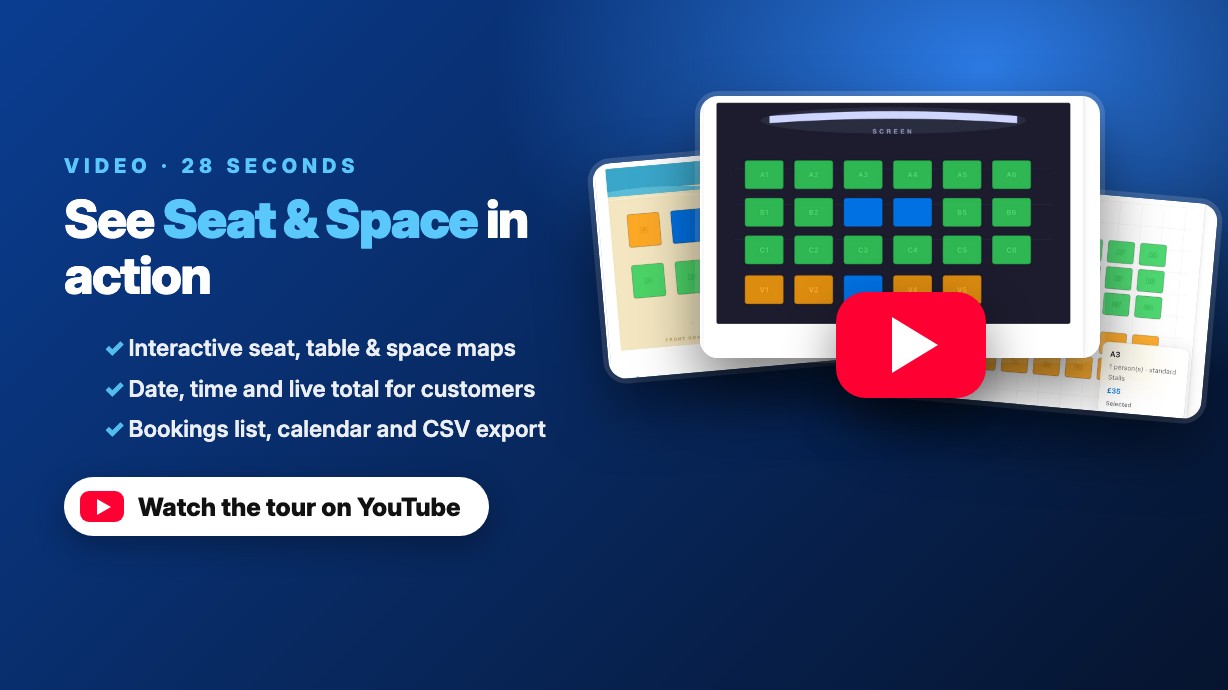
Seat & Area Reservation Map turns any picture — a restaurant flooring plan, a cinema seating chart, a parking zone, a seaside structure — into a completely interactive reserving interface. The location proprietor attracts bookable areas over the picture in a visible builder, assigns a reputation, kind, capability and worth to every, and publishes with a single shortcode. Guests then see dwell availability (out there, premium, chosen, reserved), decide their spot, select a date and time, and full the acquisition via the native WooCommerce checkout.
No web page builders required, no month-to-month SaaS charges, no exterior companies. All the things runs by yourself WordPress set up with a customized, listed database desk constructed for quick availability lookups.
Video tour (28 s): youtube.com/shorts/1Z7aNkAwTQ8
Touchdown Web page: seatmap.webkodingtheme.com
Restaurant Demo: Table booking with date & time
Cinema Demo: Multi-seat selection
Theater Demo: Zone filter (Stalls / Balcony) & accessible seats
Coworking Demo: Instant desk booking, filter by floor
Parking Demo: Space reservation
Seashore Demo: Sunbed booking
WP Admin Demo: seatmap.webkodingtheme.com/wp/wp-admin/
Admin credentials: demo / SeatMapDemo!

One engine, many industries
Restaurant / Café — Add your flooring plan, draw every desk, set capability and worth, and let friends reserve a selected desk for a selected date and time slot.
Cinema / Theatre / Occasions — Lay out rows and seats, outline VIP sections, and permit guests to pick out a number of seats without delay with an routinely calculated whole.
Parking / Coworking — Flip a parking zone or workplace structure into reservable bays, desks or assembly rooms, with premium or EV areas highlighted.
Seashore / Pool / Venues — Map sunbeds, cabanas or stands and cost extra for premium positions corresponding to front-row sea views.

A builder that looks like a design software
The admin builder renders your flooring plan on an SVG canvas. Swap between Choose, Rectangle and Polygon instruments to attract bookable areas immediately over the picture — rectangles for easy seats and tables, polygons for irregular shapes. Click on any space to open its properties panel and set the label, kind, worth, capability and shade. Full undo / redo historical past enables you to iterate with out worry, and the background picture could be swapped at any time from the WordPress media library. Whenever you save, every map exposes a copy-ready shortcode corresponding to [reservation_map id=”17”] proper within the record desk.

Clear, mobile-friendly choice
Guests first select a date (and a time slot when enabled), then click on areas on the map. Obtainable spots are inexperienced, premium spots stand out in their very own shade, the present choice turns blue, and already-reserved spots are crimson and locked. Single-select mode fits one-table or one-bay bookings, whereas multi-select mode is right for cinema seats and teams, with a dwell whole that updates as seats are added. Hover tooltips present every space’s label, capability, kind and worth. When prepared, the choice is pushed straight into the WooCommerce cart and the usual checkout completes the order.
New in v2.0 — a wiser customer toolbar
Each printed map now carries a built-in toolbar so guests discover the fitting spot in seconds. Dwell search and filter slender the map by identify, availability and most worth, with a working proven / whole depend. Tag seats with zones (Stalls, Balcony, Terrace, Flooring 1…) and guests can filter by zone from a dropdown. Mark wheelchair-accessible (♿) seats and let guests present solely these. A present / cover seats toggle reveals the underlying floor-plan picture, a share button copies a direct hyperlink to the map, and a printable seat manifest offers workers a clear record. Each software is on by default and could be switched off per map — and it’s absolutely backward appropriate, so present maps, reservations and shortcodes maintain working untouched.

Run the entire operation from wp-admin
A devoted Reservations display lists each reserving with its map, space, date, visitor and standing. Swap to the Calendar view to see bookings laid out by day. Filter by map, standing (pending / confirmed / cancelled) and date vary, or search by visitor. Replace a reserving’s standing with a single click on, and export the complete record to CSV (hardened towards spreadsheet method injection) for reporting or your individual information.
Workers entry by function (v2.5.0). Select which roles — Editor, Creator, Contributor, Store Supervisor or your individual customized roles — can view and export reservations, and which might additionally affirm, cancel and add notes. Entrance-desk workers can work the record with out being directors, and view-only workers can by no means change a reserving.

Developer-friendly and safe
SeatMap follows WordPress and WooCommerce greatest practices finish to finish: each database question makes use of $wpdb->put together(), all output is escaped, and write operations are guarded by functionality and nonce checks. Maps are a customized put up kind, reservations dwell in a devoted listed desk for quick availability lookups, and a clear srm/v1 REST namespace powers the entrance finish. Embed a map with a shortcode or the included Gutenberg block. The plugin ships with a .pot file for full translation, carries no third-party dependencies, and by no means telephones residence.

Roadmap
Deliberate additions embody an Elementor widget, recurring availability intervals, QR-code reservation validation, deposits / partial funds, and deeper WooCommerce Bookings integration. Suggestions from consumers immediately shapes priorities.
Necessities
WordPress 6.0 or increased
WooCommerce 7.0 or increased (beneficial for checkout)
PHP 7.4 – 8.3
Examined with fashionable WordPress and WooCommerce releases.
Assist
Assist covers bug fixes, compatibility updates and utilization questions via our Envato profile. Response occasions are sometimes inside one enterprise day on weekdays.
License
Common License — Use in a single finish product which finish customers aren’t charged for. One license per finish product.
Prolonged License — Use in a single finish product which finish customers could be charged for. One license per finish product.
For full phrases, see Envato Standard Licenses.
Changelog
v2.5.2 (2026-11-23)
– Mounted: a seat booked for the entire day or a number of days might be booked once more for a time slot on these days
– Mounted: a single day inside a multi-day keep confirmed the seat as out there
– Mounted: a seat within the cart is all the time amount one
– Mounted: previous and non-existent dates are refused by the server
– Mounted: trashing or deleting an order frees its seats
v2.5.1 (2026-11-23)
– Compatibility: the plugin header now states “Examined as much as: 7.1”, matching the readme.
– Added: a one-time ranking request on the plugin’s personal settings display after 7 days of use. It may be dismissed, and the selection is remembered per consumer.
– Modified: the ranking request information is eliminated when the plugin is deleted.
– Up to date: translation template (.pot).
v2.5.0
– New: Settings › Reservation entry — decide which roles can view and export reservations, and which might additionally affirm, cancel and add notes. Directors all the time have full entry; your present setting carries over on replace
– Mounted: visitor bookings on maps with out a date picker and with out a WooCommerce product now work (booked for the present day; seats taken in the present day present as reserved)
– Mounted: when a reserving is refused, the visitor type reveals the explanation as a substitute of failing silently
– Examined with WordPress 7.1 and WooCommerce 11.3
v2.4.1
– Mounted: masses on PHP 7.4 once more (the minimal model it declares)
– Mounted: seat availability is simply answered for printed maps
– Modified: CSV export and forex image behave the identical on PHP 7.4 to eight.5
v2.4.0
– Mounted: with WooCommerce checkout, a seat in somebody’s cart is now held (quarter-hour by default) and confirmed as quickly because the order is paid, so two clients can not pay for a similar seat and slot
– Mounted: a reservation belonging to a different order is rarely taken over; the order will get a word as a substitute
– New: appropriate with the WooCommerce Cart and Checkout blocks
v2.3.0
– New: developer hooks for add-ons — refuse a reserving earlier than it’s created or added to the cart, mark further seats as taken on the map, and react when a reservation is confirmed or cancelled
– Lets add-ons corresponding to calendar sync block seats and comply with bookings with out touching the core plugin
– Additive and absolutely backward appropriate — nothing adjustments until an add-on or your individual code makes use of the hooks
v2.2.0
– New: month & season pricing — set a rule for particular months, so one map can cost a high-season charge (e.g. July–August) and a decrease low season one
– Months mix with the prevailing weekday / weekend situation, so “July and August weekends” is a single rule
– Multi-day bookings that span two months are priced per day, so a keep working from July into August is calculated accurately
– Additive and absolutely backward appropriate — a rule with no months chosen applies all 12 months, precisely as earlier than
v2.1.2
– Mounted: “Export CSV” on the Reservations display now downloads a file as a substitute of printing the CSV into the web page
v2.1.1
– Mounted: the Filter button on the Reservations display confirmed “Sorry, you aren’t allowed to entry this web page”
v2.1.0
– New: slot offset per space — shift an space’s slots later so an off-grid time turns into bookable (opening 12:00 with 75-min slots? give 3 tables a 45-min offset and 19:00 seems for precisely these tables)
– New: weekly schedule — mark weekdays closed and set per-weekday opening hours (e.g. 12:00–22:00 weekdays, 13:00–22:00 weekends)
– New: “Require time choice” — stops a reserving being saved at midnight when the customer by no means picked a time
– Additive and absolutely backward appropriate — present maps maintain their actual behaviour; the brand new setting stays off on them till you flip it on
v2.0.2
– New: Electronic mail Textual content settings — customise the wording (topic, heading, message, footer word) of the confirmed, pending & cancelled reservation emails, with {venue} / {identify} placeholders
– Mounted: with “Auto-confirm” enabled, the reservation e mail wrongly mentioned the reserving was “pending affirmation” — confirmed bookings now present the right confirmed wording
– Additive and absolutely backward appropriate — depart any area clean to maintain the prevailing textual content
v2.0.1
– New: circle drawing software — draw spherical / oval seats (bar stools, café tables); drag a sq. for an ideal circle, a rectangle for an oval
– Mounted: a legacy per-map forex image (e.g. £) that would show as “u00a3” now reveals accurately, routinely
– Additive and absolutely backward appropriate — present maps, reservations and shortcodes are preserved
v2.0.0
– New: premium customer toolbar — dwell filter & search (identify / availability / max worth) with a proven / whole depend
– New: zones — tag seats by zone and let guests filter the map by zone
– New: accessibility — mark wheelchair-accessible seats and filter to point out solely them
– New: present / hide-seats toggle, share hyperlink, and printable seat manifest
– New: Map Builder “Customer instruments” toggles + per-seat zone / accessible fields with bulk assign
– Two extra demos (Theater, Coworking); fastened an empty “Visitors” selector on single-capacity seats
– Absolutely backward appropriate — present maps, reservations and shortcodes are preserved
v1.0.1
– Builder and frontend polish
– Bug fixes and stability enhancements
v1.0.0
– Preliminary launch
– Visible map builder (rectangle & polygon)
– Single & multi-seat choice with date / time
– WooCommerce checkout integration
– Reservation administration (record, calendar, CSV export)
– Shortcode & Gutenberg block

