


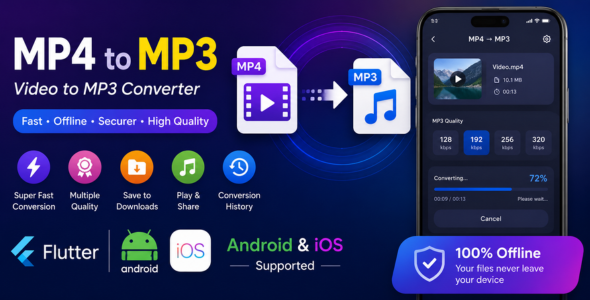
MP4 to MP3 Converter with AdMob — Flutter App (Android & iOS)
An entire, ready-to-publish Flutter supply code that lets customers decide any video from their cellphone and
immediately convert it to a high-quality MP3 audio file — 100% offline, no web required for
conversion.
Powered by FFmpeg, monetized with Google AdMob (Banner + Interstitial advertisements), designed
with Materials 3, and constructed with clear Riverpod structure. Simply swap in your
AdMob App ID, change the package deal title, add your keystore, and ship to the Play Retailer or App Retailer.
Who Is This For?
- Builders who wish to launch a monetized audio utility app quick with out constructing from scratch
- Freelancers in search of a strong, well-structured Flutter codebase with advertisements already wired up
- Studios wanting a privacy-first, offline app with built-in Google AdMob income from day one
✅ Key Options
Core Conversion
- Convert any MP4 (or any video) to MP3 — powered by FFmpeg Package
- Selectable bitrates: 96 kbps, 128 kbps, 192 kbps, 256 kbps, 320 kbps
- Actual-time conversion progress bar with stay share
- Cancel conversion at any time mid-process
- Detects and alerts if the chosen video has no audio stream
Google AdMob Monetization
- Banner Advert — displayed persistently on the backside of the principle display
- Interstitial Advert — proven after every profitable conversion for max income
- Adverts load and pre-cache within the background utilizing a singleton
AdService - Swish fallback — if an advert fails to load, the app continues working with none crash or freeze
- Auto-reloads the subsequent interstitial instantly after one is dismissed or fails to point out
- Simply substitute the 2 take a look at Advert Unit IDs in
lib/providers/ad_service.dartwith your personal stay IDs
Good File Administration
- Save to customized folder — person picks through Android Storage Entry Framework
- Fallback to Downloads folder if no customized folder is about
- Automated duplicate file dealing with (e.g. “track (1).mp3”, “track (2).mp3”)
- Persistent folder permission throughout app restarts
Conversion Historical past
- Each transformed file is mechanically saved to a historical past record
- Reveals file title, period, bitrate, file measurement and conversion date
- Play transformed MP3 instantly within the app with a built-in audio participant
- Share or open information with any exterior app (music gamers, cloud storage, and many others.)
- Delete particular person data or clear all historical past with one faucet
⚙️ Settings & Customization
- Change default save location from the Settings tab
- Reset save location to the default Downloads folder
- Toggle Darkish / Mild mode — handbook override from the AppBar
- Single seed coloration in
foremost.dartcontrols the total Materials 3 theme
Design & Structure
- Materials 3 design system with adaptive darkish and lightweight themes
- State administration with Flutter Riverpod 2.x
- Clear separation:
screens/,providers/,widgets/,suppliers/,
fashions/ - Historical past continued regionally utilizing SharedPreferences
- No exterior backend, no Firebase required
What Is Included
- ✅ Full Flutter supply code (Android + iOS)
- ✅ Google AdMob absolutely built-in — Banner & Interstitial advertisements able to go
- ✅
AdServicesingleton — clear, reusable advert administration class - ✅ Native Android Kotlin code (
MainActivity.kt) for file saving - ✅ Customized folder picker utilizing Android Storage Entry Framework
- ✅ Full
documentation.htmlwith step-by-step setup information - ✅ AdMob setup part in documentation — learn how to swap take a look at IDs for stay IDs
- ✅
key.properties.instancetemplate for Android signing - ✅ App icon asset (1024×1024 PNG) prepared for
flutter_launcher_icons - ✅
.gitignorepre-configured to exclude keystore and signing information - ✅
flutter analyzepasses with zero points
️ Technical Specs
- Framework: Flutter 3.x / Dart 3.x
- State Administration: Flutter Riverpod 2.6
- Audio Engine: ffmpeg_kit_flutter_new_audio 2.5
- Adverts SDK: google_mobile_ads (newest)
- Advert Codecs: Banner Advert + Interstitial Advert
- Android min SDK: 24 (Android 7.0 Nougat and above)
- Android compileSdk: 36
- iOS minimal goal: iOS 14 and above
- Package deal title:
com.smallburnstudios.mp4tomp3(absolutely customizable) - Design system: Materials You / Materials 3
Documentation Covers
- Introduction & characteristic overview
- System necessities (Flutter SDK, Android Studio, Xcode, JDK 17)
- Folder construction map
- How one can substitute take a look at AdMob IDs along with your stay Advert Unit IDs
- How one can register your app in AdMob and get an App ID
- How one can change the package deal title / Utility ID
- How one can change the app title (Android + iOS)
- How one can change the app icon (with
flutter_launcher_icons) - How one can change the app theme coloration (single line change)
- Android — Generate a launch keystore
- Android — Create
key.properties - Android — Replace
construct.gradle.ktswith launch signing - Construct launch APK / AAB
- iOS — Change Bundle ID
- iOS — Signing & Provisioning Profiles
- Troubleshooting widespread errors
- Changelog (beginning v1.0)
- Assist contact
Simple to Customise
- Swap AdMob IDs: Two constants in
lib/providers/ad_service.dart - Change app coloration: One line in
lib/foremost.dart - Change package deal title: Two fields in
construct.gradle.kts+ rename Kotlin folder - Change app title: One line in
AndroidManifest.xml+ one line in
Data.plist - Change app icon: Substitute
property/icon/icon.pngand run one command
Privateness & Safety
- All conversions occur totally on the person’s system — no information are ever uploaded
- No analytics, no crash reporting, no person monitoring past what AdMob collects
- AdMob follows Google’s personal privateness coverage and complies with GDPR / CCPA pointers
- Keystore and signing credentials are excluded from Git by default
Changelog
v2.0.0 — August 2026 (AdMob Launch)
- Added Google AdMob integration — Banner Advert on foremost display, Interstitial Advert after every conversion
- Added
AdServicesingleton for clear, centralized advert lifecycle administration - Interstitial advert pre-caches on app begin and auto-reloads after dismissal
- Up to date documentation with AdMob setup information (App ID + Advert Unit IDs)
v1.0.0 — August 2026 (Preliminary Launch)
- First launch of MP4 to MP3 Converter
- FFmpeg-powered audio extraction from any MP4 video file
- Customized output folder choice utilizing Android Storage Entry Framework
- Full conversion historical past display with file particulars and fast actions
- Share and open transformed MP3 information instantly from the app
- Materials 3 design with darkish and lightweight theme assist
- About dialog with app data and have record
- Helps Android 7.0 and above (API degree 24+)
- Helps iOS 14 and above
Assist
We intention to answer inside 24 to 48 hours. Use the Feedback part on the merchandise web page,
or e mail us instantly. Please embrace your buy code in your message.
© 2026 TechArt Studios · MP4 to MP3 Converter

